
DreamCat1.2 - App Store
You'll be able to see results in few seconds.
Publisher Description
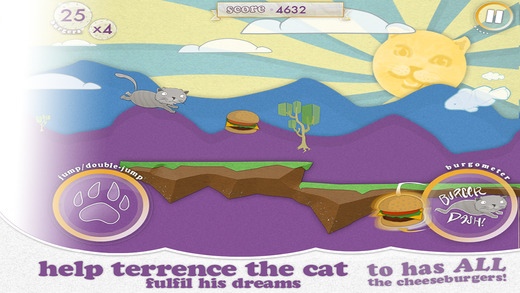
Navigate through Terrence the cat's dream world and help him eat all the cheeseburgers!
Experience the most exciting fast-paced runner game for iOS. Jump across walls, collect burgers, perform mighty burger dashes and lots more in DreamCat. With stunning retina graphics and an addictive gameplay, DreamCat guarantees hours of fun.
--- HOW TO PLAY ----
While running, tap once to jump across platforms, tap and hold to jump higher and tap twice to double jump. Eat burgers along your way to charge up your mighty burger dash. Use your to dash to move forward rapidly and avoid obstacles!
--- FEATURES ----
Featuring randomly generated and in nite terrain, DreamCat will keep you entertained and challenged for hours.
As you keep progressing by jumping and dashing, the di culty level increases and so the does the momentum. Stay alert, jump with absolute precision, collect many burgers and you will soon climb the prestigious DreamCat leaderboard.
Addictive gameplay
Fast paced fun
Stellar graphics Collect many burgers to score more points
Game Center and Leaderboard integration to keep a track of who's on top
In-built store featuring wallpapers and new cats
With Game Center, achievements and leaderboard completely integrated with DreamCat, it is a fun social game. Compete with friends, share scores and see who's faster in running and tackling with Terrance, the cat.
-----------FOLLOW VELLUM INTERACTIVE-------------
Follow DreamCat on Twitter - @vellumgames
Like DreamCat on Facebook - http://facebook.com/velluminteractive
Website - http://velluminteractive.com/dreamcat
Get DreamCat now to immerse into a whole new dimension of quick gaming.
Requires iOS 4.3 or later. Compatible with iPhone, iPad, and iPod touch.
About DreamCat
The company that develops DreamCat is Vellum Interactive, Inc.. The latest version released by its developer is 1.2.
To install DreamCat on your iOS device, just click the green Continue To App button above to start the installation process. The app is listed on our website since 2012-08-01 and was downloaded 0 times. We have already checked if the download link is safe, however for your own protection we recommend that you scan the downloaded app with your antivirus. Your antivirus may detect the DreamCat as malware if the download link is broken.
How to install DreamCat on your iOS device:
- Click on the Continue To App button on our website. This will redirect you to the App Store.
- Once the DreamCat is shown in the iTunes listing of your iOS device, you can start its download and installation. Tap on the GET button to the right of the app to start downloading it.
- If you are not logged-in the iOS appstore app, you'll be prompted for your your Apple ID and/or password.
- After DreamCat is downloaded, you'll see an INSTALL button to the right. Tap on it to start the actual installation of the iOS app.
- Once installation is finished you can tap on the OPEN button to start it. Its icon will also be added to your device home screen.
Program Details
System requirements
Download information
Pricing
Version History
version 1.2
posted on 2012-08-01
Disclaimer
Official App Store Link
We do not host DreamCat on our servers. We did not scan it for viruses, adware, spyware or other type of malware. This app is hosted by Apple and passed their terms and conditions to be listed there. We recommend caution when installing it.
The App Store link for DreamCat is provided to you by apps112.com without any warranties, representations or guarantees of any kind, so access it at your own risk.
If you have questions regarding this particular app contact the publisher directly. For questions about the functionalities of apps112.com contact us.
